
The Anticipation of a New Order
You finally found the perfect items. You clicked “buy” on CNfans. The excitement is real. You imagine your package arriving at your door. Then, you check your dashboard. You see the word “Pending.”
Minutes turn into hours. Hours turn into days. The status does not change. Naturally, anxiety starts to kick in. You wonder if your payment failed or if the item is out of stock. This article explains the “behind-the-scenes” of procurement. Buying globally is not like buying locally. There are many steps between your click and the final delivery. Our goal is to pull back the curtain on warehouse operations. We want to help you set realistic expectations for your shopping journey. Understanding the process reduces stress. It helps you plan your hauls better. Let’s explore why “Pending” is a normal part of the cycle.
What Does “Order Pending” Actually Mean?
The “Pending” status is the first step in your order’s journey. It means your payment was successful. CNfans has received your request. However, the item is not yet purchased. It is currently sitting in a digital queue. During this stage, the system assigns your order to a professional shopping agent.
The Agent Assignment Phase
These agents act as your personal buyers. They do more than just click buttons. They verify the seller’s reliability. They check if the item is in stock. They ensure the price you paid matches the current market price. This stage is a crucial safety check for you. If a seller has a poor track record, the agent will catch it. This prevents your money from being tied up in a failed transaction.
Knowing how to use cnfans effectively starts with the dashboard. Simply log in and click on “Order.” You will see your list of items. If you see “Pending,” stay calm. It means the system is working. Your agent is simply preparing to make the purchase safely. Give the team a little time to work their magic.
The Lifecycle of a CNfans Order
Understanding the order lifecycle helps manage expectations. Each stage has a specific purpose. Here is the step-by-step breakdown of your item’s journey.
| Status | What is Happening? | Typical Duration |
|---|---|---|
| Order Pending | Awaiting agent assignment and review. | 1–24 Hours |
| Order Processing | Agent is verifying stock with the seller. | 1–2 Days |
| Purchased | Funds sent to seller; item awaiting dispatch. | 1–3 Days |
| Sent | Seller has shipped item to warehouse. | 2–5 Days |
| Warehouse Received | Item arrived for QC and storage. | Ongoing |
Each step takes time. Domestic shipping usually takes 2 to 5 days. High-demand items might stay in the “Purchased” phase longer. Be patient during these transitions. Monitoring these statuses is the best way to learn how to use cnfans like a pro.

Isabella Xu
Founder & Lead Procurement Specialist @ OOPBUY AGENCY
As an expert in 1990s Shanghai sourcing with years of experience in the US and Canadian luxury and 3C markets, I specialize in cross-border procurement and supply chain optimization. My mission is to provide professional, transparent service, empowering global consumers to access premium Chinese goods effortlessly.
5 Factors Influencing Warehouse Processing Times
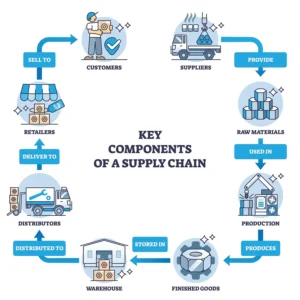
Many variables affect your CNfans order processing time. According to logistics industry benchmarks, processing can fluctuate significantly based on external conditions (Source: Global Logistics Performance Index). Here are the five main reasons for wait times.
1. Seller Dispatch Speed
CNfans acts as your agent, not the seller. Some ship in hours; others take days.
2. Domestic Transit
China is vast. Packages may travel thousands of miles to reach the warehouse.
3. Order Volume
Holidays like Lunar New Year create backlogs in scanning and storage.
4. Inspection Detail
Every item undergoes Quality Control (QC). Detailed photos ensure accuracy.
5. Operational Hours
Remember the time zone differences. While you are awake, the warehouse team may be sleeping. Standard business hours and weekends also apply. Orders placed on Friday night may not move until Monday morning.
How to Use CNfans Efficiently: Pro Tips
Smart shopping saves time. You can influence your CNfans order processing time with a few simple habits.
- ✔ Choose High-Rated Sellers: Look for high “shipping speed” scores. Some sellers ship within 24 hours.
- ✔ Consolidate Your Orders: Buying items at once minimizes the time spent waiting for multiple “Pending” windows.
- ✔ Use the Inquiry Feature: If an order is stuck for more than 5 days, use the “Order Inquiry” button to nudge your agent.
- ✔ Time Your Shopping: Aim for mid-month windows. Avoid major holidays like Golden Week when logistics pause.
When Should You Contact Support?
Patience is key, but you should know when to step in. A “normal” CNfans order processing time for procurement is 3 to 7 days (Source: CNfans Service Level Guidelines). This includes the time for an agent to buy the item and the seller to ship it.
Red Flags:
If your order stays “Pending” for more than 7 days without updates, contact your agent via the “Inquiry” button next to the item list. It may be out of stock.
FAQ: Common Questions About CNfans Logistics
Q1: Can I cancel my order while it is still “Pending”?
A: Yes. You can usually cancel for a full refund at this stage because funds haven’t been sent to the seller yet.
Q2: Does “Pending” mean my payment failed?
A: No. It means your payment was successful and you are simply in the queue for agent assignment.
Q3: How long is the average CNfans order processing time in 2026?
A: Most orders move from “Pending” to “Purchased” within 2 to 5 business days, assuming the seller is active.
Q4: Why is one item in my haul “Stored” while another is still “Pending”?
A: Every seller operates independently. Geographical distance and individual seller efficiency cause items to arrive at different speeds.
